MCP: what it is, why it matters, how to connect one, and how I use it
What MCP is in plain words, how it differs from an API, how to connect a connector, and how I use it myself every day.
There are three letters everyone who's opened an article about AI in the past year has heard: MCP. It sounds like the name of a protocol from a movie about hackers, but it's actually the most boring and most useful thing that has happened to AI assistants. Let's work out what it is, why it matters to you personally, and why I genuinely don't work without it anymore.
Honest up front: I won't load you with the spec. I'll explain it the way I explain it to clients and to friends who need a result, not a diploma in protocols. There will be a few technical words after all, but I promise to unpack every one in human terms.
What MCP is, without the tedium
MCP stands for Model Context Protocol. It's an open standard for how an AI app connects to external systems: to your Google Calendar, Notion, Slack, a database, even your accounting system.
The authors (that's Anthropic, the makers of Claude) describe MCP in one phrase:
USB-C for AI. A standard socket.
And it really is a good analogy. Remember how every device used to have its own charger, and you'd dig through a box of cables looking for the right one? And then USB-C arrived, and one connector fit everything. MCP is roughly the same, just for AI and your tools.
I'll make one caveat right away so you don't end up with inflated expectations. MCP is not "a plug any AI automatically connects to". It's a standard an app can support (or not). And under the hood an MCP server usually just neatly wraps a service's ordinary API so the AI knows how to talk to it. So zero magic, just an agreement, like USB-C. But it's exactly these boring agreements that turn into convenient things.
How this differs from an API (and why it matters to you)
If you've ever commissioned an integration, you've heard the word "API". The difference is simple, and I'll explain it on the same outlet.
An API is the specific outlet of one service. Notion has its own API, your CRM has its own, your bank has its own. For an AI to start working with Notion, a developer has to connect to Notion specifically. Want to add Slack too, you write a separate integration for Slack. Every new AI tool, every new service, and again from scratch.
MCP is the standard for the plug that AI apps which support it can plug into. A service builds one MCP server, and then any compatible AI can use it: Claude, ChatGPT, Cursor, VS Code, with no rework for each one.
| API | MCP | |
|---|---|---|
| What it is | The outlet of a specific service | A standard plug for the AIs that support it |
| Who connects | A developer to each service separately | Any compatible AI through one server |
| Built once and | works with one app | works with all compatible ones |
That's why there's so much noise around MCP. It's not yet another feature, it's a common language the big players agreed on. Before, every "AI plus service" pairing was hand-built, now there's a standard. Boring? Yes. Important? Very.
How it works inside: host, client, server
You can skip this section if the outlet analogy is enough for you. But if you want to understand what happens when the assistant "reaches into" your Notion, here are three words that describe the whole construction.
- The host is the app with the AI that you're sitting in. Claude, ChatGPT, your code editor. It's in charge, it conducts.
- The client is the part of the host that keeps the connection to one specific server. Each connected service has its own client, like a separate cable.
- The server is the wrapper over the service (over that same Notion or your database) that hands the AI data and actions.
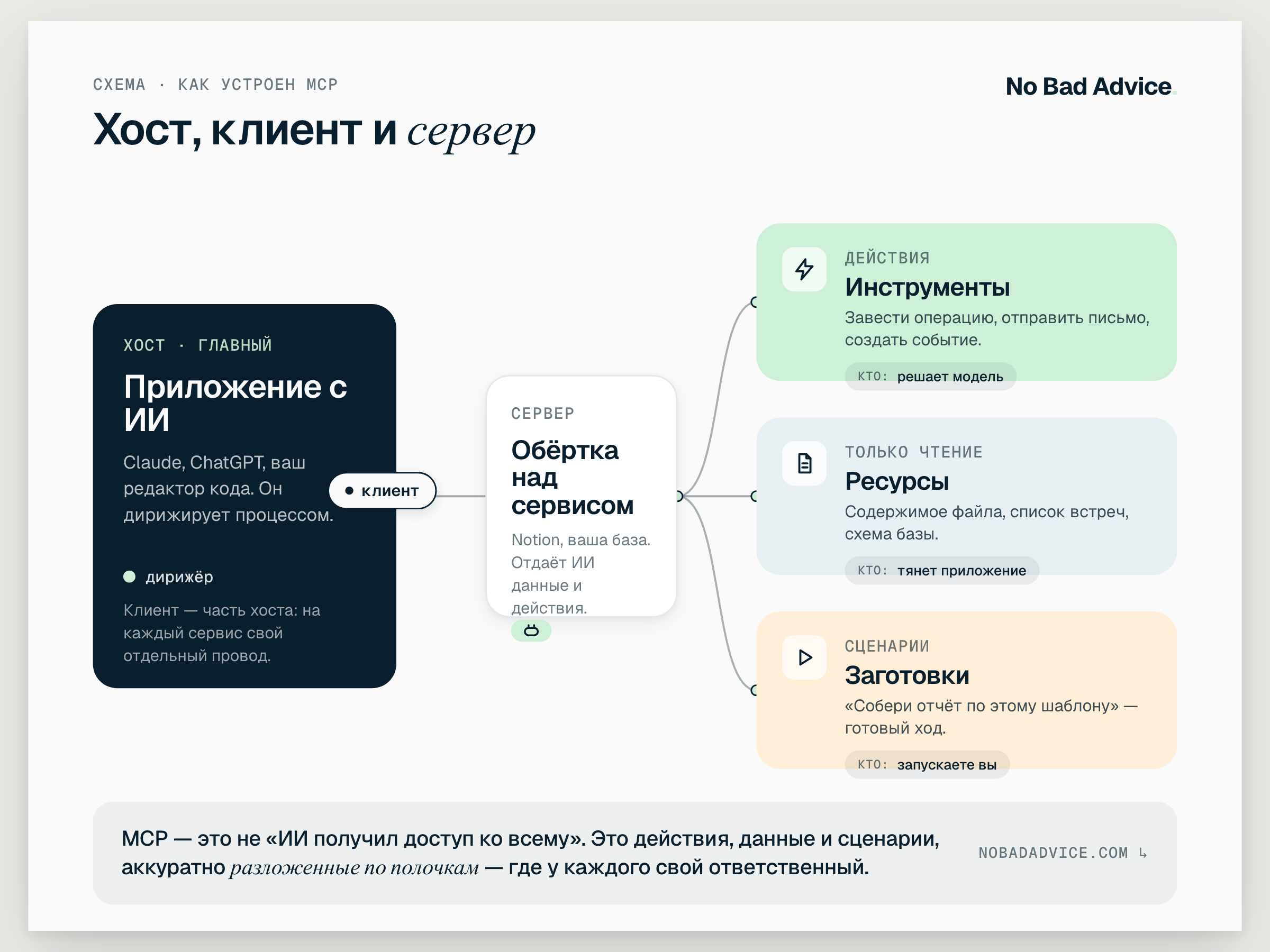
And the server hands the AI three types of things, and here it helps to understand the difference, because it determines who's in charge and when:
- Tools. These are actions: create a transaction, send an email, create a calendar event. When to call them is decided by the model itself as the conversation goes.
- Resources. These are read-only data the server provides for context: the contents of a file, a list of meetings, a database schema. They're pulled in by the app, so the AI has something to lean on.
- Prompts. These are ready-made scenarios in the spirit of "put together this kind of report for me from this template", which you launch.
It sounds stuffy, but the point is simple: MCP isn't "the AI got full access to everything". It's actions, data, and scenarios neatly sorted onto shelves, where each one has its own owner.
Ready-made connectors: what it looks like in my day
Now the liveliest part. For a ton of popular services, MCP servers are already written for you, and they connect in a couple of clicks on the paid plans of Claude and ChatGPT. They're called connectors. No code, you go into settings, hit "connect", log in, done.
Let me show you from my own list, so this doesn't hang in the air. Here's what I actually have connected and working.
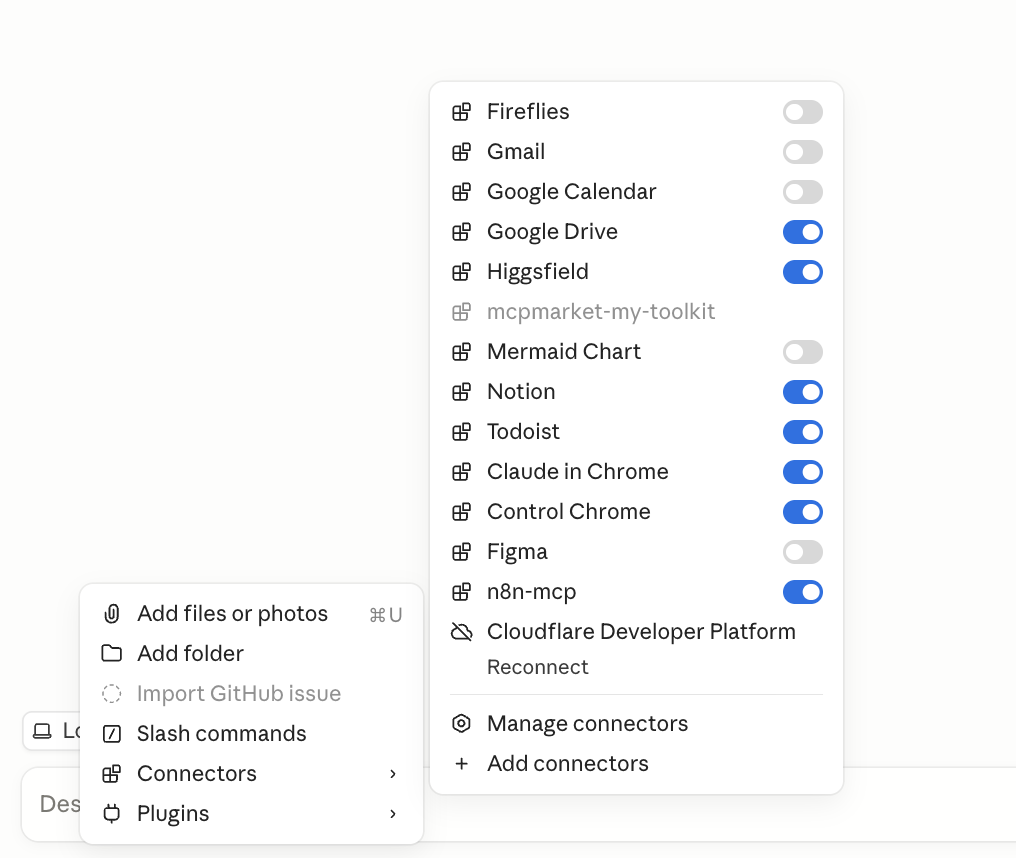
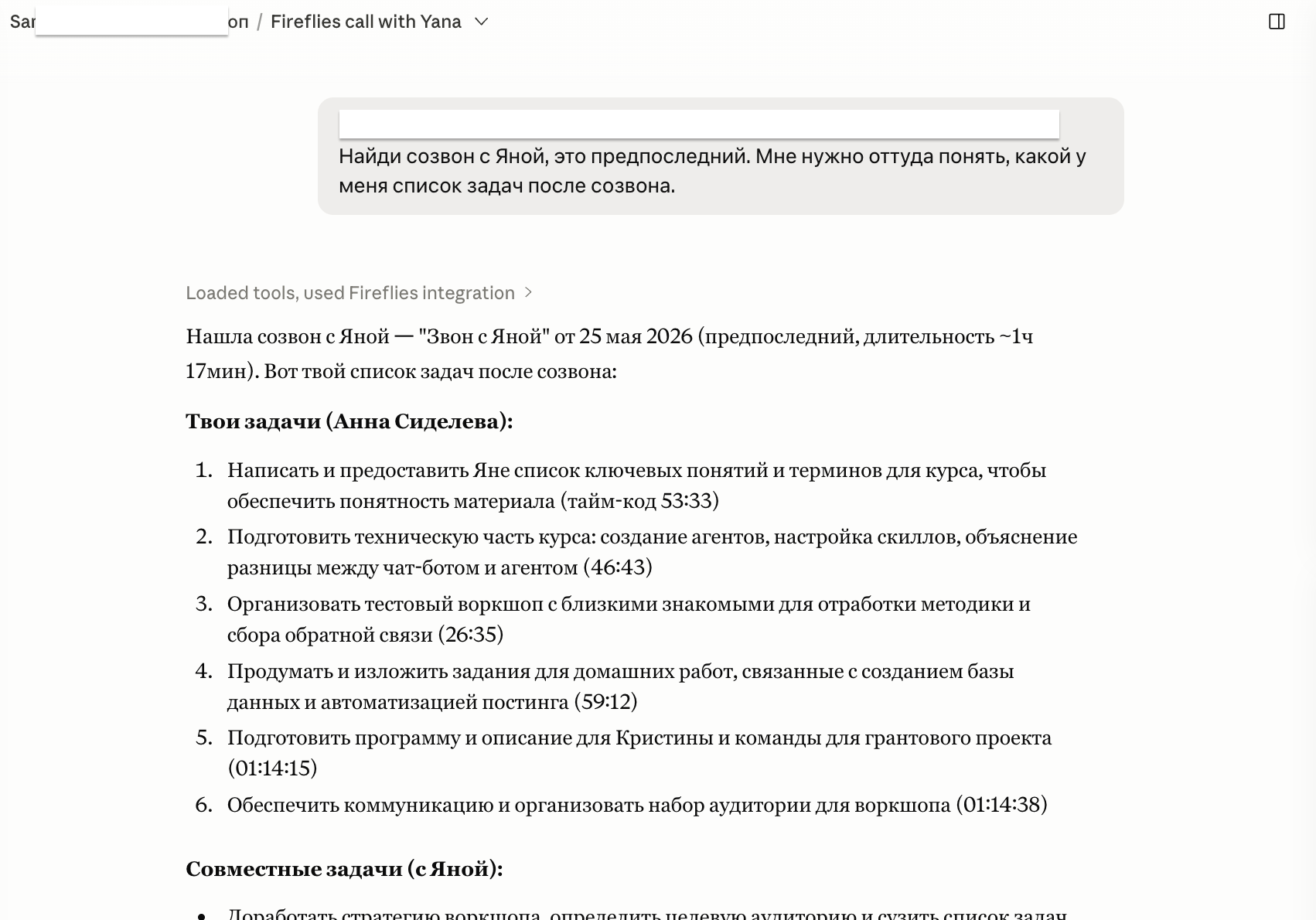
Fireflies (it records and transcribes my video calls). I've used it for ages, it's paid for, and now I just write to my assistant in plain words: "find my call with Yana, it's the second to last, and write out what tasks I have after it". It reaches into Fireflies, finds the right meeting, and assembles the list. Then with one move I ask it to drop those tasks into Todoist, and there they are.
Todoist is my task list. My morning and evening brief rests on it, by the way: every day at 9:30 the agent tells me what's on the plan, what it can tidy up itself, and in the evening it sums up and reschedules the unfinished. But I'll write about that agent separately, it deserves its own article.
Gmail and Google Calendar. Clear enough here: "write a draft email to this person", "what important meetings do I have next week", "add the event date". In plain words.
Google Drive. This one I love especially. I make project documentation for clients, and now I don't open it by hand at all. I tell the assistant what needs describing, and it creates the documents and folders right in Drive itself. I just read the result.
Notion for notes, n8n (more on it separately below), Mermaid for diagrams when I need to see the logic of a process with my own eyes. A couple more connectors are hooked up but I barely touch them yet: Figma (I used to draw right in the chat, now I've mostly moved to Claude design), Higgsfield for Reels (connected, but I haven't gotten to it), and work things like Cloudflare. Video and the marketing connectors will get their own conversation too.
The point I want to get across: this isn't "I'm a geek and I have everything connected". It's "I stopped opening five tabs to do one action". A connector is exactly the moment when AI turns from a talking head into an assistant that actually does something in your tools.
How to connect a connector: step by step
If you want to try right now, here's the whole path. Zero code, takes a couple of minutes. I'm showing it on Claude, in ChatGPT the logic is the same.
- Get a paid Claude or ChatGPT plan (free plans usually don't have connectors).
- Open settings and find the "Connectors" section. There's a list of services you can connect.
- Pick the service you need from the ready ones: Google Calendar, Notion, Todoist, Gmail, and so on. Hit "Connect".
- Log in to the service and confirm access, like a normal sign-in through Google. Check exactly what you're allowing.
- Done. The connector appears in the list, and the assistant can use it right away. Test it on a real task: not "tell me about my calendar", but "find a free hour this week and put a call there".
Where to look for connectors and what's out there:
- Anthropic (in Claude) and OpenAI (in ChatGPT) have their own built-in catalogs of ready connectors right in the settings. That's the first place to look.
- If you want a wider view of what's on the market, a handy catalog of MCP servers is mcpmarket.com. You can search there for a server for a specific service.
When there's no ready connector: you write your own
And now the honest flip side. Ready connectors don't exist for everything. And this is where it gets interesting.
I had a specific task: automate the financial reports for my company. We keep management accounting in a system called PlanFact and talk in Slack. Both have an open API, so technically you can reach them. But there's no ready MCP connector for either. They simply don't exist in the connector directory.
So I stood up my own MCP servers: one for PlanFact, the other tied to Slack, and connected this to the assistant. Now I talk to my finances in plain language:
- "Show the balances across all accounts"
- "Create a transaction: payment to a contractor, 800 dollars"
- "Put together a month-by-month overview and highlight where expenses grew"
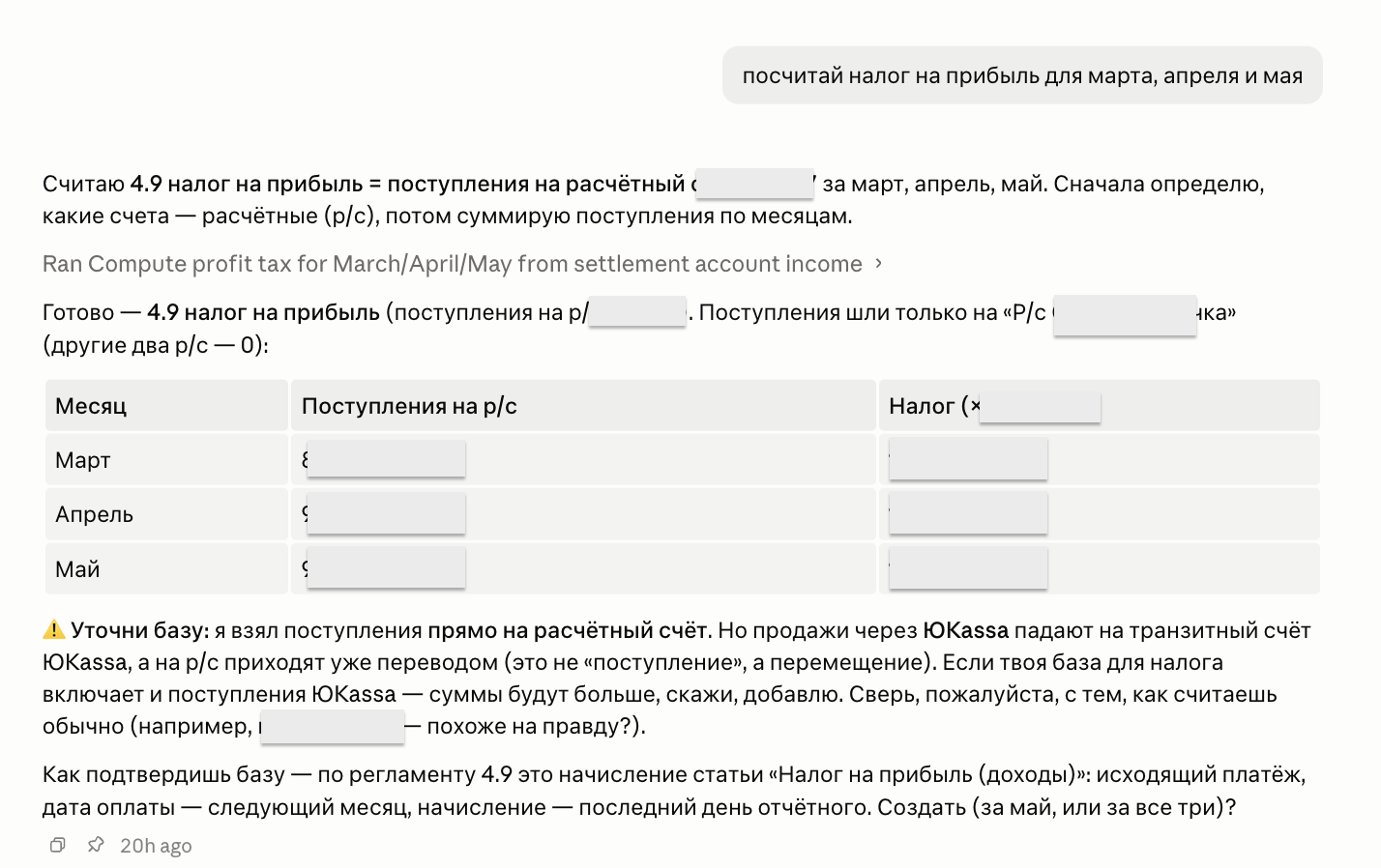
And it's exactly the same story as with connectors, except I built the server myself, because there wasn't a ready one. For now it lives locally on my machine, and publishing it on GitHub is a separate item on my list.
One thing I'll call out separately, because for finance it decides everything: the assistant doesn't go off and create an accrual silently. First it shows the calculation, clarifies which base to use (for example, whether to count payments through YooKassa that first land on a transit account), and only then, with my permission, creates the transaction. That's what confirmation before an action involving money should look like, which I'll come back to below.
The same principle works with n8n. My self-hosted n8n is connected to the assistant, and I can say: "go into this process, see where it's failing, fix the node" or "let's sketch a simple workflow for this kind of logic". Simple things it puts together itself, and I check.
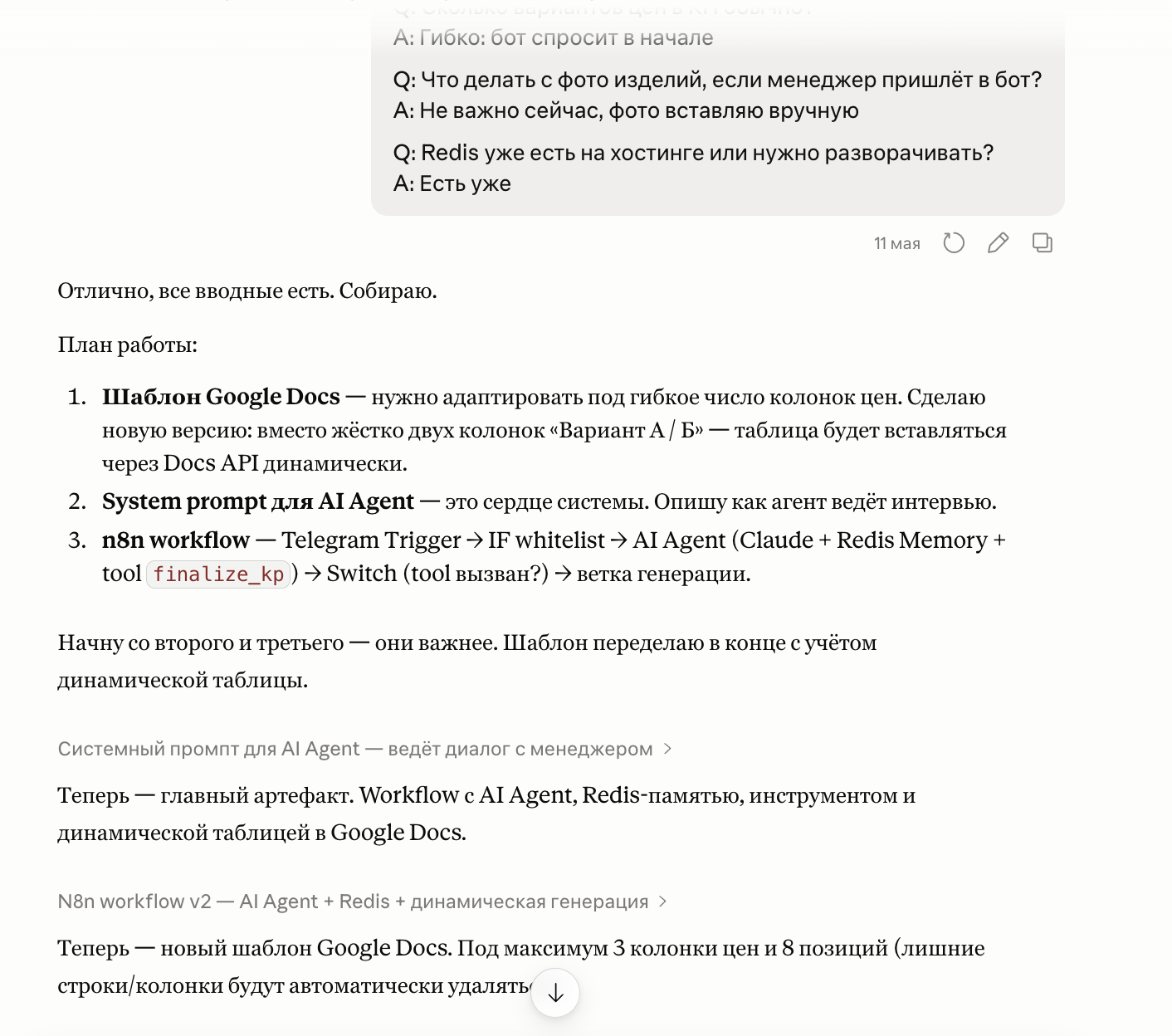
The line here is simple. There's a connector, you use it in two clicks. No connector but there's an API, you can write your own MCP server (that's developer work, but understandable and finite work). Neither one nor the other, then MCP won't help you yet, and the task gets solved by good old automation another way.
Where MCP came from and who owns it now
A quick bit of history, because it often gets retold inaccurately, and I like it when the dates are in place.
MCP was invented at Anthropic (the same people who make Claude) and released into open access in late November 2024. Then the thing that's the main sign of success for a standard happened: competitors picked it up. Over the course of 2025, OpenAI, Microsoft, and Google added MCP support to their products.
And in December 2025, Anthropic handed the protocol to a separate foundation, so the standard wouldn't belong to one company. The exact name, if you're curious: the Agentic AI Foundation, a separate foundation under the wing of the Linux Foundation. Alongside MCP there are also projects from Block and OpenAI. In plain terms: MCP stopped being "a thing from Anthropic" and became shared infrastructure that a neutral organization is responsible for. For you this means one thing: you can safely lean on this standard, it won't disappear on one company's whim.
A little honest truth
As I've said, the result matters to me, so I'll tell it like it is.
MCP doesn't work everywhere. It only kicks in where there's an MCP server for a service: a ready connector or one written for you. If there's no server for your tool and no one to build it, MCP won't help, and then the task gets solved by a chain through n8n or a direct API.
And setup is still needed. "Connect AI to my tools" isn't a "make it good" button, it's a small engineering project: choose what we're connecting, grant the access, check that the assistant won't do anything it shouldn't. And here's an important security thing: you're giving the AI access to real data and actions, so for money, mailouts, and important emails, connect it so that it asks for confirmation before doing anything. There's no such thing as free automation, the only question is which type of complexity suits you better.
Where to start
In short: connect one connector to a service you already use, and give the assistant a real task in it. Once you see how much time it saves, you'll want to connect the rest.
And when you realize you really want to connect some tool but there's no ready connector, that's where someone like me comes in to write an MCP server for your system. The way I did for PlanFact.
FAQ
How is MCP different from an ordinary plugin or integration?
A plugin usually lives inside one app and by its rules. MCP is a common standard: one server, and any compatible AI can connect to it. Roughly speaking, a plugin is an adapter for a specific outlet, while MCP is the agreement that everyone's outlets are the same.
Do I need to know how to code to use this?
To connect ready connectors, no. It's a couple of clicks in settings on a paid plan. Code is needed in only one case: when there's no ready connector and you want to write your own MCP server. That's already a developer task.
Is it safe? I'm giving the AI access to my data.
The access is real, and you need to take it seriously. Connect only what the task needs, don't hand out access "just in case", and set up confirmation before actions involving money, emails, and mailouts. MCP doesn't "leak" your data on its own, but you're responsible for which keys and permissions you granted.
I don't have a connector for my service. What do I do?
Check whether the service has an open API. If it does, you can write your own MCP server for it, and then the assistant will work with it like any other connector. That's exactly what I did for PlanFact and Slack. If there's no API, MCP won't help here, and then we look toward other automation.
Will MCP replace n8n or Zapier for me?
No, they're about different things. MCP gives the assistant hands to do something at your live request in a dialog. n8n and Zapier are about processes that run on their own, on a schedule or an event, without you. They often get along great: I hook n8n up to the assistant through MCP myself.
Is it free?
The standard itself is open and free. But the convenient ready connectors connect on the paid plans of Claude and ChatGPT. And if you need your own server for your service, that's already work someone does by hand.
If you've realized you really want to make some tool of yours friends with AI, but there's no ready connector for it, that's solvable. Write to me on Telegram or leave a request, tell me what you use and what you'd like to automate, and I'll honestly say whether it's done through a ready connector, through your own MCP server, or another way entirely.
Drop the article into your AI and adapt it to your own task.
ChatGPT or Claude will open with a ready prompt about this piece. Take it from there.

Hi, I'm Anna.
In business since 2011, and for the last few years I build AI automation. I founded moremotions.ru, co-own Heritage, and put together bots and integrations for small business. Based in Tbilisi, working remotely with the whole world.

Want to automate something in your business?
Tell me what you're sick of doing by hand. 30 minutes for a brief, then a concrete offer or an honest no if it's not my kind of task.