What an AI agent is, in plain words: how it differs from a chat and a project
A chat answers, an agent acts. With simple examples, we work out where an ordinary chat with files ends, where an agent begins, and why you don't need one for every task.
Over the past year the word "agent" has stuck to absolutely everything. Agent this, agent that, everyone has an agent, go get yourself an agent. It sounds like some special kind of magic available only to people who live in the terminal and wear hoodies. In reality an agent is the same LLM that stops being just a window for questions and becomes part of a working setup: it sees the context, understands the goal, can call a tool, decides for itself how to do the task, and, most importantly, does the task itself. So it's easier to think of an agent not as a separate entity but as a way of working: less "answer me", more "do it for me, by my instructions".
In this article we'll work out what a chat is, what a project is, what an agent is, and how they actually differ from each other, in plain human language.
The short version
A chat answers. An agent acts.
An ordinary chat is a conversation: you asked, it answered, and then you decide what to do with it. An AI agent is a system in which the model decides for itself what to do next, and does it itself: it plans the steps, picks the tools, checks the result, and works toward the goal until it hits a limit or finishes the task. You give it a task, the agent plans how to do it and does it.
Everything else in this article is just unpacking that one difference. And a spoiler right away: an agent is far from necessary for every task, but it sells beautifully on social media through FOMO.
The ladder: from chat to agent
The clearest way to explain this isn't through a definition but through a map. Most "AI things" line up into a ladder, where each next rung adds capabilities to your assistant. Here it is, bottom to top:
| Rung | What gets added | In human terms | Example task |
|---|---|---|---|
| Chat | Basic conversation | Asked, got an answer | "Rewrite this text shorter" |
| Project (folder in chats, Custom GPT) | Your own instructions and files inside a folder | An assistant "in role": works inside the folder and quickly pulls in your context | A "Marketing" folder: brand rules and price list on hand in every chat |
| Cowork / Codex | Access to a local environment (a folder on your computer) | Can go and do the task right on the computer | "Fix, read, or edit a file in my folder" |
| Tool | A specific action | What the model can physically do | Search the web, calculate, read a file |
| MCP | A standard socket to services | How the assistant reaches external services and performs actions in your apps | "Create a dinner meeting", "save a note to Notion" |
| Skill | A reusable method | A "handbook": a folder with files and instructions the model pulls out itself | Build a post in your brand voice; write an SEO article from a template |
| Plugin | A set of skills, connectors, and commands | A ready-made role in one package | Install the "finance" plugin, and Claude is set up for finance |
| Agent | Autonomy | An LLM with context and tools: plans the steps itself and does the task | "Put together the monthly report": it decides what to do and in what order, and does it |
Don't be scared that there are a lot of rungs. You don't need to memorize them. Below I'll walk through the key ones and show the difference on everyday examples. And one thing worth singling out right away is MCP: I didn't put it on its own rung by accident. Almost everything the assistant does with your external services (Notion, Gmail, calendar, CRM) goes through MCP. So it's not a detail, it's a load-bearing wall. More on MCP in a separate article.
Chat: it answers, but does nothing on its own
The very bottom of the ladder is an ordinary chat. You opened ChatGPT or Claude in the browser, typed a message, got an answer. It's the basic unit everyone knows.
Here it's important not to fall for a common myth. People often say: "regular AI doesn't remember anything between chats and knows nothing about your files." That's a simplification that's already untrue. Memory and context access depend on the specific product and your settings: modern Claude and ChatGPT have memory across conversations, and you can turn it on, off, and clear it. So it's more accurate to put it this way: in its simplest form a chat is a conversation, and on its own it doesn't dig into your documents or perform actions in your services until you've connected that separately.
A chat is great for plenty of tasks: rewrite text, explain something confusing, brainstorm ideas, translate, break down a contract. If a task is solved with one question and one answer, you don't need any agent, and that's not "falling behind", it's just common sense.
Project or Custom GPT: a folder with files and instructions
The next rung is a workspace. In Claude it's called a Project, in OpenAI there are Projects and Custom GPTs.
Picture a folder that has its own instructions ("answer in this tone", "here are our brand rules") and uploaded files (guidelines, price list, knowledge base). And this context is loaded into every chat inside the folder automatically. An ordinary chat is one notebook. A project is a shelf of themed notebooks, and each shelf has its own library and its own rules.
The analogy I use: a project is an assistant you brought up to speed once, so you don't have to explain who you are and what you want from scratch every time.
There's a nuance people love to mix up. A Project and a Custom GPT are relatives, but not the same thing. A Project is your personal workspace with chats, files, and instructions. A Custom GPT is a separate configured entity with its own name, knowledge base, and optional actions, and you can share it with other people. Roughly: a project is your personal account, and a Custom GPT is a "character" you've built that you can hand to a team.
But notice: both a project and a Custom GPT still wait for your message. They're smarter than a bare chat because they know the context, but they don't launch anything of their own accord. It's still about "answer", not "go and do".
What an AI assistant is made of: a head and three hands
Before climbing up to the agent, let's break down what any smart assistant is built from. In engineering texts this is given the fancy name augmented LLM, meaning an "enhanced model". I explain it as a head and three hands.
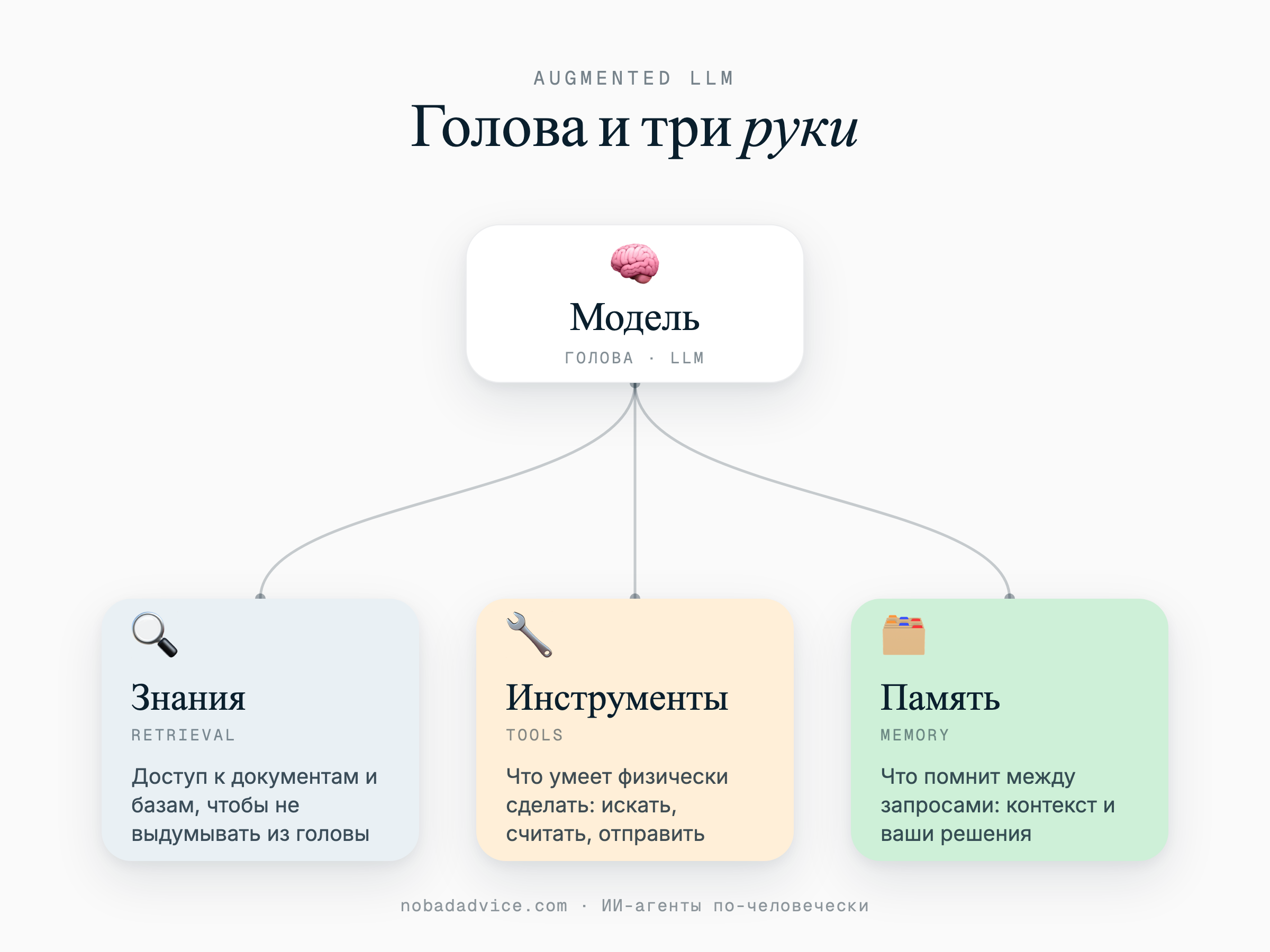
- The head is the model itself. It understands language, reasons, formulates. But a head without hands is just a very well-read conversationalist.
- 🔍 Knowledge (retrieval). Access to documents and databases: the model can look into the right file or reference instead of making things up.
- 🔧 Tools. What the model can physically do: search the internet, run a calculation, send an email, create a calendar event.
- 🧠 Memory. What the assistant remembers between requests: your preferences, past decisions, the context of the work.
This construction, a head plus three hands, is the brick everything else is built from. A project adds knowledge to the head. Tools give it hands. Memory keeps the assistant from being a goldfish. And an agent is what appears when the head is allowed to decide for itself which hand to use and when.
Tool, MCP, skill, plugin: briefly, so they don't get muddled
Four words that constantly get dumped into one pile. Let me explain in a minute, because the difference is simple.
- A tool is what the model can do. One specific action: web search, run code, read a file, take a screenshot. It's a hammer.
- MCP is a standard socket through which the assistant reaches external services: your Notion, email, calendar, CRM. I wrote about MCP in detail separately, but in short: it's not "a plug any AI connects to", it's an open standard that apps can support, and under the hood it usually just neatly wraps a service's ordinary API. MCP stands apart from a tool precisely because it's about the connection to the outside world, not about one action.
- A skill is a handbook for how to do a task, which the model pulls off the shelf itself when the task fits. A hammer is a tool, and "how to assemble a shelf with a hammer and screws" is a skill. Without the hammer the handbook is useless, without the handbook you have the hammer but don't know what to build.
- A plugin is a little suitcase of several skills plus connectors, slash commands, and sub-agents, gathered into one package. If a skill is one handbook, a plugin is a whole set of handbooks and tools for one role: you install one plugin, say "finance" or "designer", and Claude gets a stack of skills and connections for that work all at once. So a plugin is a rung above a skill, not a synonym for it.
One thing worth remembering about plugins: it's a product-specific term, not a universal standard. At Anthropic a plugin is this kind of package of skills, connectors, and commands. In another app the same word will mean something completely different: somewhere it's just an interface extension, somewhere an add-on over a single service. So when you hear "plugin", ask whose exactly.
Agent: when the AI charts the route itself
Now that we have a head, hands, and sockets, we can assemble an agent.
Anthropic themselves, in the article "Building Effective Agents", describe an agent like this: it's a system in which the model dynamically directs its own processes and tool use, keeping control over how it does the task. In human terms: you say "here's the goal, here are the tools, now figure it out", and the route is born in the moment. The model looked at the result, thought, decided what to do next, did it, looked again.
So you don't file everything under "agent", keep five signs handy. It's an agent if it:
- Plans on its own and keeps working without your step-by-step pointing after the start.
- Uses tools in a loop: called one, got a result, decided what's next, called again.
- Relies on real feedback from the environment (what the service returned, what the file showed), not on guesses.
- Can pause and ask you if it's stuck or things smell of money.
- Has stopping conditions: the task is done, the step limit is used up, help is needed.
An example, to make it clear. "Research my three competitors, go to their sites, collect prices and terms into a table" is an agent task. Nobody knows in advance how many pages it'll have to open and what it'll find on them. The assistant decides for itself where to click next, and figures out for itself when the table is ready. This is exactly what OpenAI built ChatGPT agent for, and Claude takes on similar work with your local files through Cowork.
By the way, a separate note on Cowork, because it often gets confused. Cowork is a Claude product and has nothing to do with ChatGPT. And it's not the same as the desktop app: the desktop is just another interface to the same chat, while Cowork is a separate product with an agent loop and access to your local files. It can go and actually do something on your computer, not just talk.
To avoid holding all this in your head, here's a short cheat sheet: where the assistant lives on each rung and what it can really do.
| Chat | Project / Custom GPT | Cowork / Codex | |
|---|---|---|---|
| Where it lives | Browser or app | Inside the chat, a folder in the service's cloud | Desktop app or CLI (command line) |
| Sees your local files | ❌ | ❌ | ✅ |
| Does multi-step work itself | ❌ | ❌ | ✅ |
| Can run on a schedule | ❌ | ❌ | ✅ |
| When to use | Quick question or text | A role and your context on a topic | Go and do something on the computer |
You can see the pattern: the higher up the ladder, the more the assistant doesn't just answer but acts. A chat and a project live in the cloud and wait for your message, while Cowork (or Codex) comes down to your computer and can do something with the files itself.
Agent or workflow: which for which task?
This is the distinction I consider the most important in the whole article, because it's the one most often skipped.
There's a workflow. That's when the route is written out in advance, in code or in n8n (or another no-code app). Step one, step two, step three, a branch on a condition. The AI inside can be one of the steps ("classify the request", "write a draft"), but it's not the one deciding, the predefined scheme is. It's predictable and reliable.
There's an agent. That's when the route is born along the way, and the model itself decides.
| Workflow | Agent | |
|---|---|---|
| Who decides what's next | You, in advance, in the scheme | The model, in the moment |
| Route | Set before launch | Born along the way |
| Predictability | High | Lower, but flexible |
| When it's good | Steps are known and repeat | Steps can't be guessed in advance |
And here's the main piece of advice, which Anthropic themselves give and which I sign off on with both hands: start simple. Don't shove an agent in where an ordinary workflow or even a single request will do. An agent is powerful, but it's less predictable and more expensive to debug. Take the simplest tool that solves the task, and climb the ladder only when you've hit a wall.
Not every task needs an agent: working through examples
The most useful exercise. Let's take ordinary tasks and figure out where they're easiest to do. Surprisingly, "agent" will come up here less often than it seems.
- "Rewrite this post to read nicer" is an ordinary chat. One question, one answer.
- "Extract the data from this PDF into a table" is also a single request, just a bit harder. Not an agent.
- "Let every new lead from the form drop into the CRM" is automation (n8n, Zapier, Make). The steps are known, AI often isn't needed at all.
- "Help me run marketing by my brand book" is a project: context and a role, but you start the conversation.
- "Put together a weekly report for me by the same method" is a skill or Cowork: a repeatable procedure.
- "Research competitors, open their sites, build a table" now that's an agent: the route isn't known in advance.
And a separate category people forget about: when AI isn't needed at all. If the steps are fully predictable, accuracy matters more than flexibility, and a mistake is costly, then an ordinary script or formula is more reliable and cheaper than figuring out why the agent "did something off". I'm for the result, not for sticking a model in everywhere. Sometimes the smartest solution is a formula in a spreadsheet.
How agents work for me
Now a few examples from my life, but not all of them.
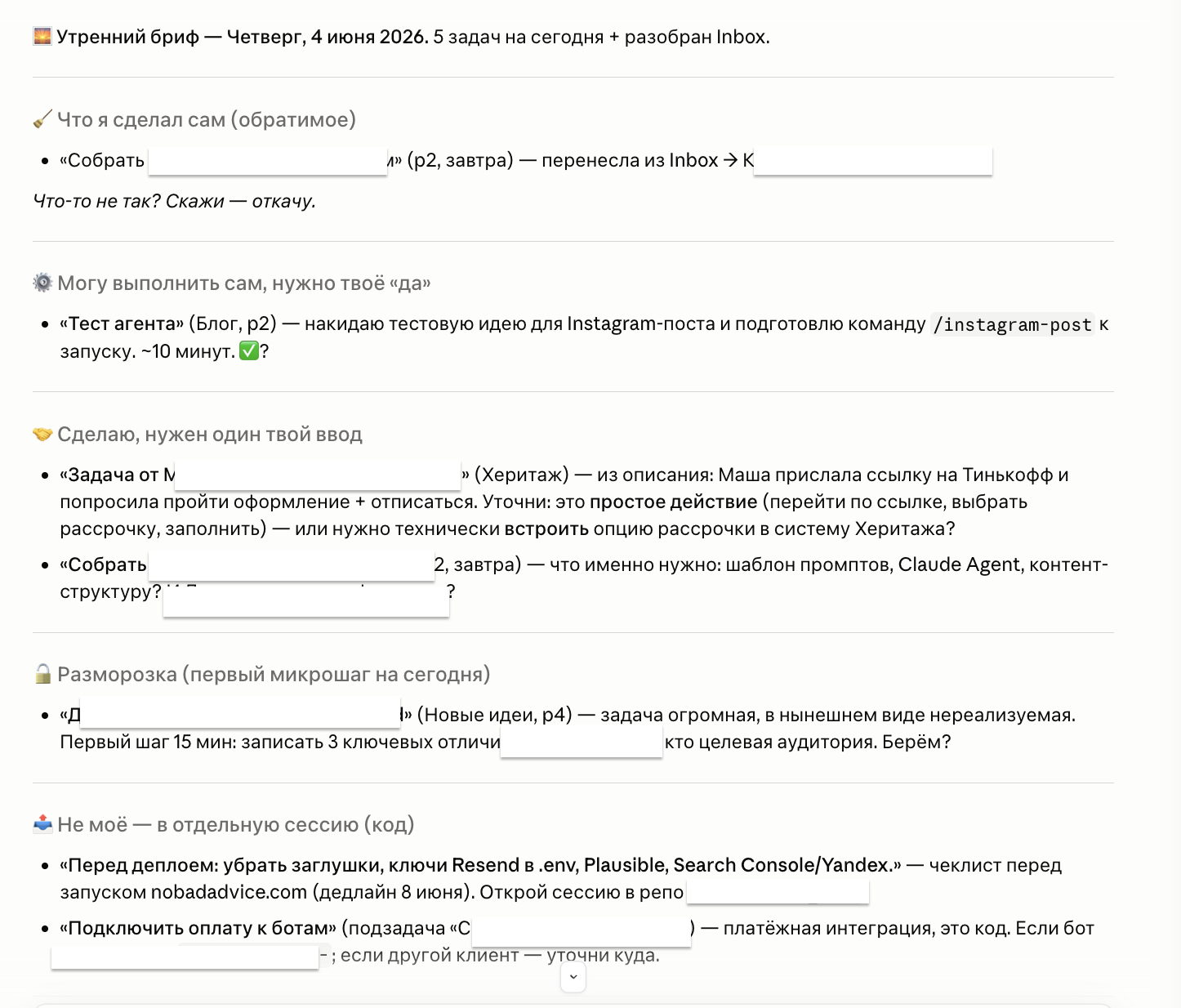
The morning and evening brief. The one I use most. An agent on a schedule: in the morning and at 9:00 PM it sends me a brief and an anti-brief itself (the brief looks forward, the anti-brief back). It has access to my task list (Todoist) and Google Calendar. In the morning it:
- checks all of today's tasks and, if something is phrased awkwardly, adds context or rephrases it, breaks project tasks into subtasks (clearing it with me);
- sorts tasks into folders and suggests a smarter way to lay out the day;
- proposes tasks to hand to my other agents, marks what it can take on and what it can't;
- where it's unsure, it asks questions and offers to break the task into sub-steps.
In the evening the second half kicks in. The evening agent picks up what the morning one sorted into folders, checks what from the plan actually got done, and reschedules the unfinished.
The financial report. A separate agent puts together my monthly financial report. I'll tell that story separately, I won't repeat it here.
SEO articles. An agent that runs content: it does the demand analysis itself, gathers the data, writes the article, and publishes it on the site. It builds the route from scratch each time, which queries to dig into and what goes into the text isn't written out in advance.
Instagram posts. Here it's a bundle of everything this article was about. The agent researches the topic, packages a carousel or Reels in my signature style (through a separate skill), shows me the text for approval, and once I've approved it, publishes the post to Instagram itself.
Note the last one: publishing is where I keep a confirmation button for myself. The agent reaches the edge, shows what it's about to do, and waits for my "yes". That's the access hygiene I keep talking about.
FAQ
How is an agent different from automation in n8n or Zapier?
By the route. Automation runs on predefined steps: an event happened, the prescribed actions ran. An agent decides for itself what to do next, looking at the intermediate result. Automation is predictable and works great where the steps are known. An agent is needed where you can't guess them in advance. They often live together: I hook n8n up to my assistant myself. And here's a pleasant surprise: you don't even have to build the workflow by hand, it's enough to ask the agent. The main no-code platforms (n8n, Make, Zapier) have their own MCP servers, so the agent connects to them and builds you a process that then runs on its own, without the agent. That's exactly how it is for me: my agent goes into my n8n and builds any workflow I need.
I have a Custom GPT for my tasks. Is that already an agent?
Probably not. A Custom GPT is a configured assistant with your context and maybe a couple of actions, but it still waits for your message and answers. It's closer to a project than to an agent. It becomes an agent when it starts planning multi-step work itself and running tools in a loop without your step-by-step pointing.
Do I need to know how to code to set up an agent?
To try the ready-made agent things (ChatGPT agent, OpenAI's Codex, Claude Cowork/Code) on paid plans, you don't need code, it's an interface. Code starts when you want your own tools, your own MCP server for a specific service, or your own schedule. That's where you either dig in yourself or call in someone like me.
Is an agent safe? It does things on its own.
That's exactly why you need to take access seriously. Give the agent only what the task needs, don't hand out permissions "just in case", and be sure to set up confirmation before actions involving money, mailouts, and important emails. A good agent first shows what it's about to do, and only does it with your "yes". This matters for your safety.
Where do I start if I want to try?
Don't climb straight to the top of the ladder. Start with a project: build a workspace with your files and instructions on one topic. Then connect a ready-made connector through MCP to a service you already use. And only when you hit a task where the steps aren't known in advance should you look toward an agent. The simplest tool that solves the task is almost always the right one.
If you're reading this and thinking "got it, but where do I apply it", write to me on Telegram or leave a request. Tell me what the task is, and I'll honestly say what you actually need: a chat, a project, simple automation, or an agent after all. No "let's urgently get an agent" just because the word is trendy.
Drop the article into your AI and adapt it to your own task.
ChatGPT or Claude will open with a ready prompt about this piece. Take it from there.

Hi, I'm Anna.
In business since 2011, and for the last few years I build AI automation. I founded moremotions.ru, co-own Heritage, and put together bots and integrations for small business. Based in Tbilisi, working remotely with the whole world.

Want to automate something in your business?
Tell me what you're sick of doing by hand. 30 minutes for a brief, then a concrete offer or an honest no if it's not my kind of task.