My best decision this year: an AI agent that sorts my task list

I built a personal AI agent: twice a day it goes through my Todoist, prepares a morning brief and an evening anti-brief, and remembers the things I've been putting off for weeks.
I've used Todoist since 2018, and all those years I had the same problem. You open your task list in the morning and there are a hundred billion things on it, half of which you've already rescheduled ten times because you don't want to do them, and they just keep hanging there, staring at you reproachfully.
In a moment like that you really want to delete the task tracker for good. The only thing that ever stopped me was the fear of making things worse. If you're somewhere near that feeling too, let me tell you what I did about it.
I built myself a personal AI agent that twice a day goes through my work mess: it checks tasks, email, calendar, and notes, prepares a plan for the day, does part of the routine itself, and honestly reports back on exactly what it touched. This isn't a separate smart program that costs thousands of dollars, it's a bundle of instructions, memory, and access to my services. Let me show you how it's built so you can put together a similar one for yourself.
What was driving me crazy
An active person's task list lives a life of its own. Every day new things appear, old ones get pushed, something gets stuck for weeks because it "needs thinking about" and there's never time to think. In the end the tracker turns from a helper into a source of guilt: it reminds you not about what to do, but about how much you haven't done.
I run several directions at once plus my personal life, and sorting this list by hand ate up both time and nerves. I didn't want another pretty list, I wanted someone to take the sorting off my hands. So I gave the agent its role in one sentence: you're a COO, not a reporter. Don't show me the list, sort it.
What it does every day
The agent writes to me twice a day.
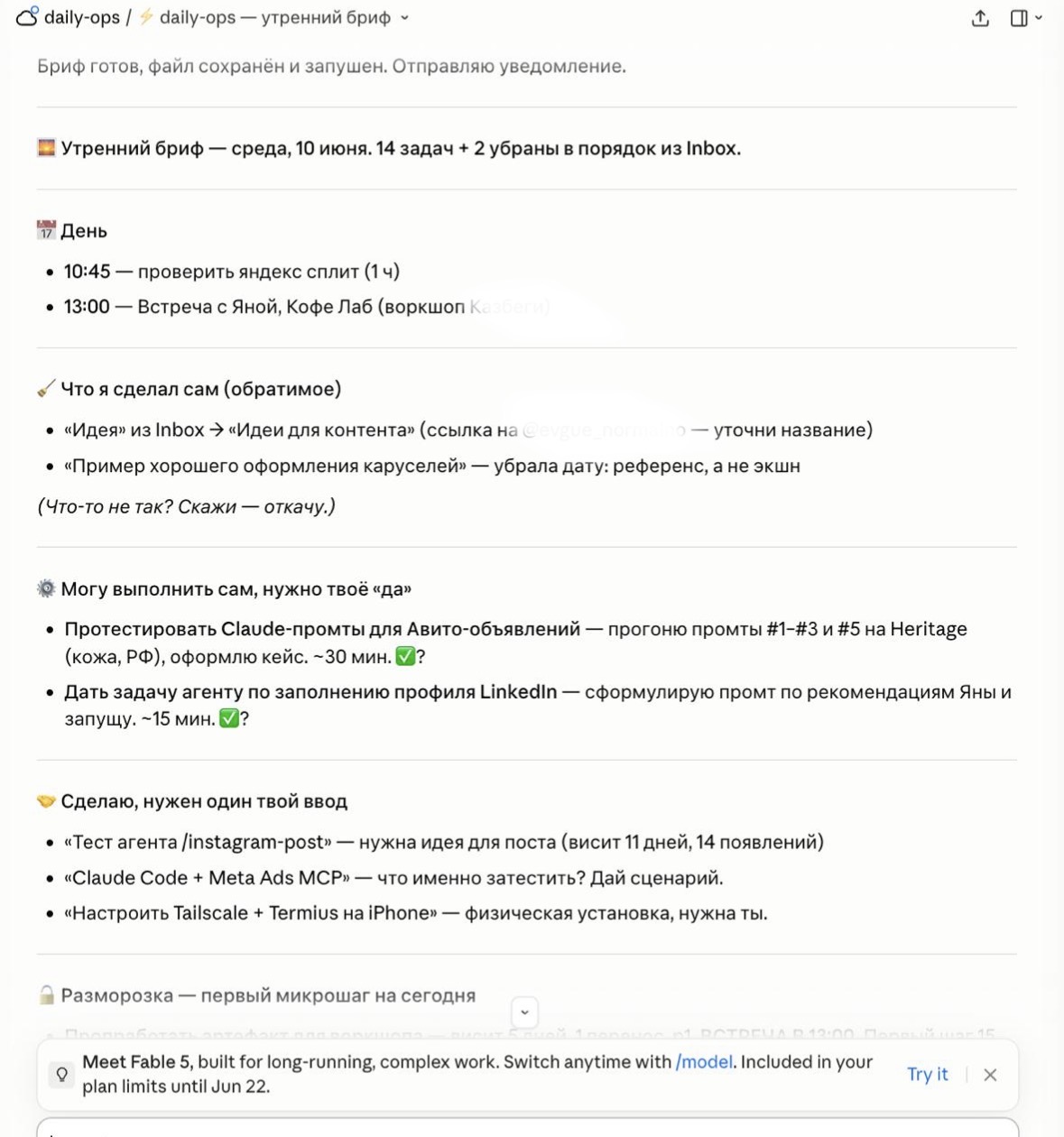
At 9:30 in the morning it sends a brief. It takes today's tasks and the overdue ones, checks email, calendar, and notes, and lays everything out into clear buckets:
- what it already did itself (small reversible stuff, more on that below);
- what it can do itself, but needs my "yes";
- what it will do, but needs one input from me (an idea, a scenario, a decision);
- what's stuck and needs "unfreezing", meaning the first micro-step for today.
At the end it tells me what to start the day with and why this exactly: not "the task is big and scary", but "the first step is this, it'll take about fifteen minutes".
At 9:00 in the evening the anti-brief arrives. It's a summary of the day: what's closed, what we're rescheduling (each reschedule with a reason, not silently), what can't be slept through tomorrow. On a good day it looks roughly like "18 closed, 10 rescheduled", and for each reschedule you can see why.
Memory: the part I love it for
For the agent to be useful, hands (access to my programs) aren't enough. It needs memory. So it keeps a file on every task: when it first appeared, how many days it's been hanging, how many times it's been rescheduled, even if it's a subtask inside a project.
And this changes everything. Instead of a polite "you have some unfinished items" it pokes me with an honest number: "hanging for 12 days, appeared 10 times". Then it offers a choice: either it does the task for me, or it breaks it into small steps and we start with the first one. The agent literally counts how many times I've put off the same thing, and won't let me quietly forget it.
I didn't leave the memory empty at the start. I seeded it from a two-week archive: that came to 118 tasks with history, collected from 21 briefs. So from day one the agent knew my chronic stalls instead of starting from a blank page. Technically each run writes to its own branch, and a separate script on GitHub merges the memory and briefs back into the main branch itself and cleans up the extra branches after.
The trust boundary: what it does itself, and what only with my "yes"
This is probably the most important part, and exactly the part people usually fear. I didn't let the agent do everything. I split its actions into two categories.
🟢 Reversible things it does itself and reports back. Sort inbox tasks into projects, fill in context it already knows, turn a note into a project, set a priority, reschedule a task. All of this is easy to roll back, so it just does it and writes "touched this, if it's wrong, say so and I'll undo it".
🔴 Irreversible and public, only after an explicit "yes". Reply to a person, publish a post, push code, delete a task. Here it doesn't move without my consent.
I deliberately didn't let the agent delete emails or block time in the calendar. Not because it can't handle it, but because the cost of a mistake differs between reversible and irreversible actions, and a human should hold that line. An agent that limits itself sits easier with me than an agent that can do anything.
Where it lives
From the outside an agent like this looks like a complex closed system. In reality it's two simple layers.
The brain sits in an ordinary GitHub repo. It's a set of text instructions: who it is, how it behaves, what its rules and memory are. It reads this brain on every run, so to change its behavior I just edit the text.
The schedule and launch live in the cloud. I use Routine in Claude Code: on schedule it clones the repo itself, connects the connectors, and does the work. The code runs in the cloud, not on my computer, so I don't even need to be online.
The connectors it's hooked up to: Todoist (tasks), Google Calendar (meetings), Gmail (email), and Notion (content calendar), all connected. Each connector is just access to a service, nothing exotic.
What its brain is made of
If you open the repo, you can see the agent isn't one big program but neatly arranged text files:
- the core with the description of its role, voice, and autonomy policy;
- skills for specific tasks: the morning brief, the evening anti-brief, the automation radar;
- a sub-agent that once a week sorts through the pile of undated tasks;
- rules that are always on: a map of my Todoist, repo boundaries, how to keep memory, how to read the calendar and email, how to read the content plan from Notion;
- memory and the brief archive.
The whole point is in this list. An AI agent is instructions plus memory plus tools. There's no secret ingredient, and that's good news: it means anyone willing to carefully describe what they want can build one.
How I leveled it up
It wasn't like this right away. At the start it began each day from scratch and just nicely retold the list. Then I added to it in phases:
| Phase | What I added | Status |
|---|---|---|
| Memory | History for each task, honest stall numbers | Working |
| Calendar | Reads meetings for a realistic plan of the day | Working |
| Email triage | Morning digest: who's waiting for a reply, invoices, important stuff | Working |
| Automation radar | On Mondays, suggests what's time to automate | Working |
| Content plan (Notion) | Morning posting plan, evening check of what went out | Working |
| Agent dispatcher | Files a task into the right repo and launches an agent itself | In progress |
I'm especially fond of the automation radar. On Mondays the agent looks at what I do by hand too often and suggests automating it, with proof from memory. If there's nothing to suggest, it stays quiet instead of inventing a reason.
The content loop: plan in the morning, check in the evening
The newest feature, and my favorite after memory, is the content loop. I have a content calendar in Notion: what goes out and to which social network. The agent doesn't publish the posts itself, that's another agent's job. It closes the loop around publishing: in the morning it says what's planned, in the evening it checks what actually went out.
In the morning it reads the Notion calendar and says what's publishing today and on which networks. If a network has hit its posting day and there's no plan for it, it files a task like "Make a post for that network" and makes sure not to create duplicates. Each network has its own rhythm anchor: Threads on weekdays, Instagram carousels on Tuesdays and Fridays, reels as a gentle reminder on Mondays, Telegram on Wednesdays, LinkedIn on Thursdays. It doesn't touch Contra and Upwork, and doesn't bother me on weekends.
In the evening it checks the plan against reality: what went out and what didn't, and suggests moving the unpublished to tomorrow. It doesn't change the date in Notion itself and doesn't publish anything, rescheduling only after my "yes".
It's the same trust boundary as everywhere else. The agent holds the context and closes the loop (in the morning "here's the plan", in the evening "here's what came of it"), and leaves the publishing itself to me.
What it gave me in the end
A feeling of lightness. Every evening the tasks are sorted, the big ones broken into small steps, and most of the routine I just hand to the agent. I stopped recalling every morning what I hadn't finished, because it remembers that for me, and with numbers too.
I won't promise you cosmic productivity and perfect lists. Let me put it more honestly: the agent took the boring part off me (sorting, triaging, rescheduling, reminding) and left me the decisions and the interesting bits. For me, that's what proper automation is.
Let's build you one too
I'm turning the build of an agent like this into a step-by-step tutorial so you can repeat it yourself. If you don't want to wait and need a hand building your own operations assistant for your tasks and services, write to me on Telegram or leave a request. We'll figure out what in your routine is worth handing to an agent and what's better kept for yourself.
Drop the article into your AI and adapt it to your own task.
ChatGPT or Claude will open with a ready prompt about this piece. Take it from there.

Hi, I'm Anna.
In business since 2011, and for the last few years I build AI automation. I founded moremotions.ru, co-own Heritage, and put together bots and integrations for small business. Based in Tbilisi, working remotely with the whole world.


Want to automate something in your business?
Tell me what you're sick of doing by hand. 30 minutes for a brief, then a concrete offer or an honest no if it's not my kind of task.